
18Birdies Golf GPS Rangefinder
18Birdies LLCSports
4.95.34K Reviews
- Version
- 16.36.0
- Installs
- 1.00M
- Age Rating
- Everyone
Screenshots
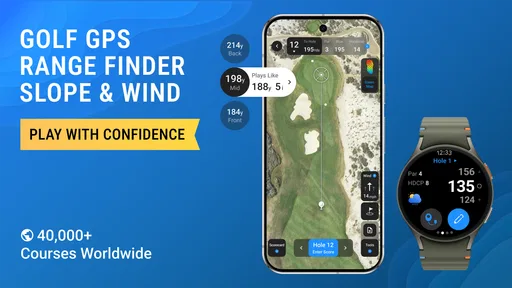
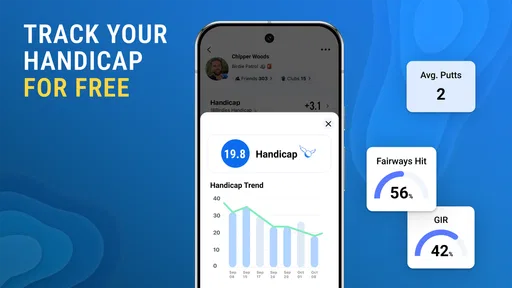
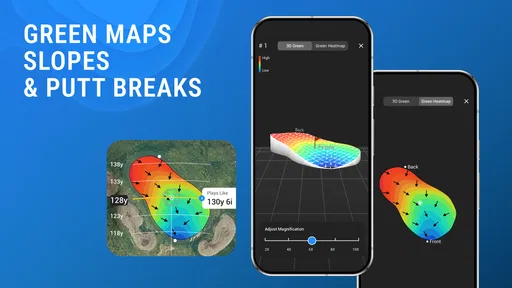
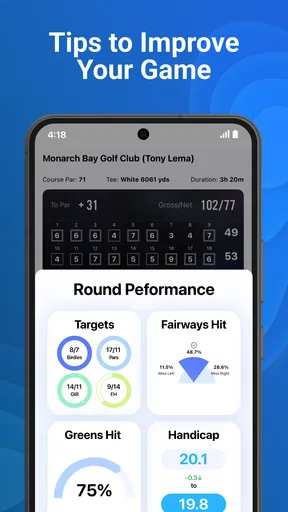
Our Review of 18Birdies Golf GPS Rangefinder
 Analysis by Appyee
If you’re new to golf apps, the main appeal of 18Birdies Golf GPS Rangefinder is having course information and a digital scorecard together rather than juggling separate tools. I’d approach it as a useful companion for a round, not as a substitute for learning your own distances or making every decision for you. Its broad feature set can be reassuring on a first visit to a course, but it also means there’s more to explore than you need on day one.
What to expect from a golf companion
18Birdies is a free sports app from 18Birdies LLC, with optional in-app purchases ranging from $2.99 to $99.99 per item. It has a 4.8 average from around 51,000 ratings and over 1 million installs. The app is rated for Everyone and has been available since 2015, so it is an established option rather than a brand-new experiment. Those figures suggest plenty of golfers have tried it, but the more important question is whether its tools fit the way you play.
On the course, the practical starting point is straightforward: use the GPS view to orient yourself, record your score, and decide afterward whether the extra analysis is useful. You do not need to treat every feature as a task to complete. If you are playing casually, a reliable routine for checking a hole and entering a score may be more valuable than trying to capture every detail of every shot.
The app’s appeal is strongest for golfers who enjoy keeping a record and want more context than a paper card provides. A scorecard can show how the round went; notes and statistics can help you spot recurring patterns. That distinction matters: tracking is useful only when you make a small, repeatable habit of reviewing what you record. Otherwise, the extra detail becomes another thing to manage during a round.
Getting Started with 18Birdies
First things first, downloading and setting up 18Birdies was a breeze. Available on both Android and iOS, the app is free to download, though it offers some premium features. Upon launching, the clean interface immediately strikes you, with vibrant colors and intuitive navigation that make it easy even for the not-so-tech-savvy golfers.
After a quick sign-up process, you're greeted with a plethora of features. The app isn't just a rangefinder; it's like having a caddy in your pocket. From GPS tracking to scorecards, it feels like a comprehensive golfing companion.
First setup without overcomplicating the round
For a first session, I’d keep setup focused on the basics: get the app ready before you reach the first tee, find the course you intend to play, and decide whether you want to enter scores as you go. That little bit of preparation helps avoid learning the interface while other players are waiting. If you prefer to keep your phone away during play, you can still use the app selectively for course orientation and save more detailed review for afterward.
One useful trade-off is that a phone-based GPS tool depends on having your phone with you and being comfortable checking it on the course. If you already wear a dedicated golf GPS watch or use a rangefinder you trust, 18Birdies may work better as a scorekeeping and review companion than as your primary distance tool. If you do not own another device, its combination of course guidance and scoring is a more compelling reason to try it.
Features That Stand Out
The app boasts an impressive array of features, but I'll highlight the ones that really stood out to me:
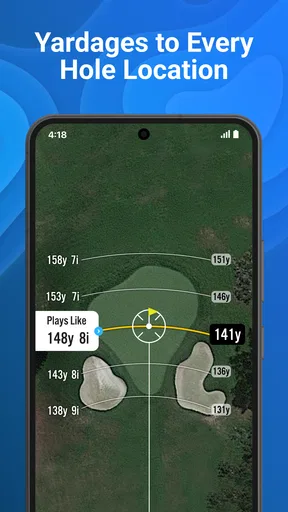
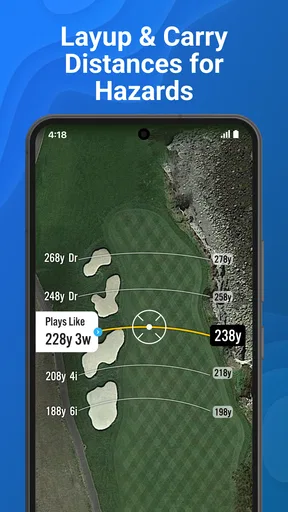
- GPS Rangefinder: This is the heart of the app. With accurate distances to greens, hazards, and landing zones, it’s a game-changer. The satellite imagery is crystal clear, and the GPS accuracy is spot on.
- Scorecard and Stats: Forget the paper scorecards! The app allows you to keep track of scores digitally, and it’s super easy to use. Plus, it tracks your stats over time, helping you understand your game better.
- Social Features: Play with friends or join tournaments. The social aspect adds a fun and competitive edge to your games.
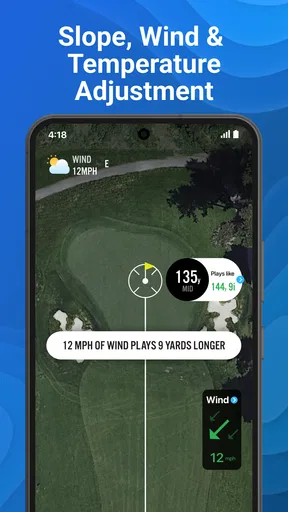
- Weather and Wind Insights: Knowing the weather conditions is crucial for a golfer. The app provides detailed weather forecasts, including wind speed and direction, which is incredibly helpful for planning your game.
- Virtual Caddy: This feature offers club recommendations based on your past performance and current conditions. It’s like having a personal coach guiding you through the course.
Making the first round useful
A simple first-round workflow keeps the app from becoming a distraction: check the hole before choosing a shot, record the score when there is a natural pause, and leave detailed analysis until you are away from the group. This is especially helpful if you are learning the game. There is little benefit in studying every number while deciding how to play; a quick look at the layout can be enough to help you choose a sensible target.
For a realistic weekend round, imagine you arrive at a course you have not played before. You can use the GPS view to get a sense of the hole, keep the scorecard in one place, and use weather or wind information as context rather than a command. Afterward, looking back at the round is more useful than trying to remember every shot. If you tend to lose track of scores or forget which holes caused trouble, that basic routine can make the app worthwhile even before you explore its advanced tools.
A practical tip is to make your first round a trial of the workflow, not a test of your golfing ability. Focus on whether the course view is easy to read, whether score entry feels natural, and whether checking a phone fits your pace of play. If it interrupts your concentration, limit use to a few key moments. The best setup is the one that helps you play more comfortably, not the one that makes you watch a screen all day.
Putting It to the Test
I took the app out for a spin on my local course, and I must say, it was a revelation. The GPS was incredibly reliable, and the distances were accurate, which made club selection a breeze. The scorecard feature was intuitive, and I found myself checking my stats more often than I’d like to admit. It’s addictive to see your progress laid out so clearly!
The social features were a pleasant surprise. I joined a weekend tournament through the app, and it was a blast. Competing with other players added a new level of excitement to my usual rounds.
When the extra tools help—and when they don’t
The rangefinder is most useful when you need a quick reference to plan a shot, but it should be one input, not an order. Wind, lie, confidence, and the shot you can actually execute all matter. A suggested club or distance can help you think through the choice, yet a recommendation based on past performance is only as meaningful as the information you have recorded. If your distances vary widely or you are still learning what each club does, treat the caddie-style guidance as a prompt to think, not a guarantee of the right answer.
There is also a real difference between this and a basic GPS watch or a handheld rangefinder. A dedicated device can be quicker to glance at and may suit someone who wants minimal phone interaction. A paper card is simpler if all you need is a score. 18Birdies makes more sense when you want several jobs—course reference, scoring, and later reflection—in one place. That convenience comes with a trade-off: a phone screen and a feature-rich app can pull attention away from the game if you keep checking it.
Golfers who enjoy tournaments and playing with friends may find the social side gives a round extra structure. For someone who prefers a quiet walk and no digital competition, those features are easy to ignore, but they are not the main reason to install the app. Likewise, players who only golf occasionally and never look back at their scores may get more from a simple rangefinder or paper scorecard. I would skip 18Birdies if you know you dislike using a phone while playing, or if you want a single-purpose device with no account-based app routine.
Common points of confusion
It is easy to assume that a digital scorecard automatically explains why a round went well or badly. It does not do that on its own. The useful step is to record scores consistently, then look for patterns over several rounds rather than drawing conclusions from one unusual day. A single high score on a difficult hole may say less about your game than the same kind of trouble appearing repeatedly.
Another common question is whether a beginner needs the full feature set. I do not think so. Start with the map and scoring, then add stats or club guidance only if you find yourself wanting that extra detail. The opposite applies to an experienced golfer who already tracks everything elsewhere: the app is worth exploring only if consolidating those habits feels easier than maintaining separate tools.
Premium features are available through in-app purchases, but the app is free to download. I would first use the free experience to see whether the interface and round workflow suit you, then decide if a paid option solves a specific need. Avoid paying simply because a feature sounds advanced; it is better value when you can name the problem it would help with, such as wanting more depth in your review routine.
Final Thoughts
After spending some quality time with 18Birdies, I can confidently say it's a must-have for any golfer. Whether you're a casual player looking to improve your game or a competitive golfer seeking an edge, this app has something for everyone. The combination of advanced GPS features, social components, and insightful stats makes it an invaluable tool on the course.
While the free version is fantastic, the premium features offer additional depth and are worth considering if you're serious about your game. Overall, 18Birdies Golf GPS Rangefinder is more than just an app; it's a golfing partner that’s there to enhance your experience every step of the way.
If you're ready to take your game to the next level, give 18Birdies a try. It might just be the best decision you make for your golfing journey. Happy golfing!
My more measured recommendation is to begin with one ordinary round, not a tournament or a day when you are trying to fix several parts of your game at once. Use the scorecard and course view, then judge whether the app makes your decisions calmer and your post-round recollection clearer. That is a concrete first success: finishing with a record you can actually use, without turning every shot into a phone interaction.
If it clicks, keep the habit modest. A few rounds of consistent scoring can be more revealing than a single session full of notes you never revisit. If it does not fit how you like to play, there is no need to force it; a dedicated distance device, a simple card, or your existing routine may be the better choice. For golfers who want an adaptable digital companion and are willing to use its tools selectively, I think 18Birdies is a worthwhile place to start.
Verdict
Strengths of 18Birdies Golf GPS Rangefinder
- Accurate GPS for precise shot tracking.
- User-friendly interface for easy navigation.
- Social features to connect with fellow golfers.
- Detailed stats to improve your game.
- Compatible with smartwatches for convenience.
Limitations of 18Birdies Golf GPS Rangefinder
- Premium features require subscription.
- Can drain battery quickly during use.
- Occasional GPS signal issues.
- Limited offline functionality.
- Ads in free version can be distracting.
Similar Picks in This Category
View All
BeSoccer: Soccer Live Score
BeSoccer apps4.3

Cricbuzz - Live Cricket Scores
Cricbuzz.com3.7

NFL
NFL Enterprises LLC2.4

Da Fit
MO YOUNG LIMITED3.6

ESPN
Disney4.5

LiveScore: Live Sports Scores
LiveScore Limited4.5
Frequently Asked Questions
What features does 18Birdies Golf GPS Rangefinder offer?
18Birdies Golf GPS Rangefinder offers a comprehensive set of features for golfers, including accurate GPS distances to greens and hazards, a digital scorecard, and advanced stat tracking. Players can also enjoy social features like leaderboards and challenges to enhance their golfing experience. The app provides personalized coaching tips, ensuring that both beginners and experts can benefit.
Is 18Birdies Golf GPS Rangefinder free to use?
18Birdies offers a free version with essential features, including GPS rangefinding and scorekeeping. However, for advanced features such as personalized coaching and shot tracking, users can subscribe to the Premium membership. This allows for a more in-depth analysis of your game, helping you improve your skills over time.
How accurate is the GPS functionality in 18Birdies?
The GPS functionality in 18Birdies is highly accurate, providing precise distances to the front, middle, and back of greens, as well as hazards. The app uses satellite imagery and course data to ensure you have the most reliable information at your fingertips. Many users find it as accurate as dedicated GPS devices.
Can I use 18Birdies without an internet connection?
Yes, 18Birdies can be used offline, but with limited functionality. Once you download the course data, you can access GPS distances without an internet connection. However, features that require online connectivity, such as real-time leaderboards and social sharing, will be unavailable until you reconnect.
Is 18Birdies suitable for beginners?
Yes, 18Birdies is ideal for beginners as well as seasoned golfers. The app offers intuitive features and personalized coaching tips that cater to players of all skill levels. Beginners can easily track their progress, learn from their game stats, and receive advice that helps them improve their performance on the course.
